What Equipment Do You Need to Start Streaming in 2026?
Want to start streaming but not sure what gear you need? This beginner-friendly guide covers all the essential streaming equipment—from your mic and camera to lighting, software, and more.
Quick answer: To start streaming, you need a device (a PC, laptop, or console), a microphone, free streaming software like OBS Studio, and a stable internet connection with at least 10 Mbps upload for 1080p. A webcam, lighting, and a capture card are upgrades you can add as you grow.
Thinking about starting your live streaming journey but not sure where to begin? Whether you’re planning to stream games, chat with your audience, or broadcast creative content, the right equipment helps you look and sound your best while keeping your setup smooth and reliable.
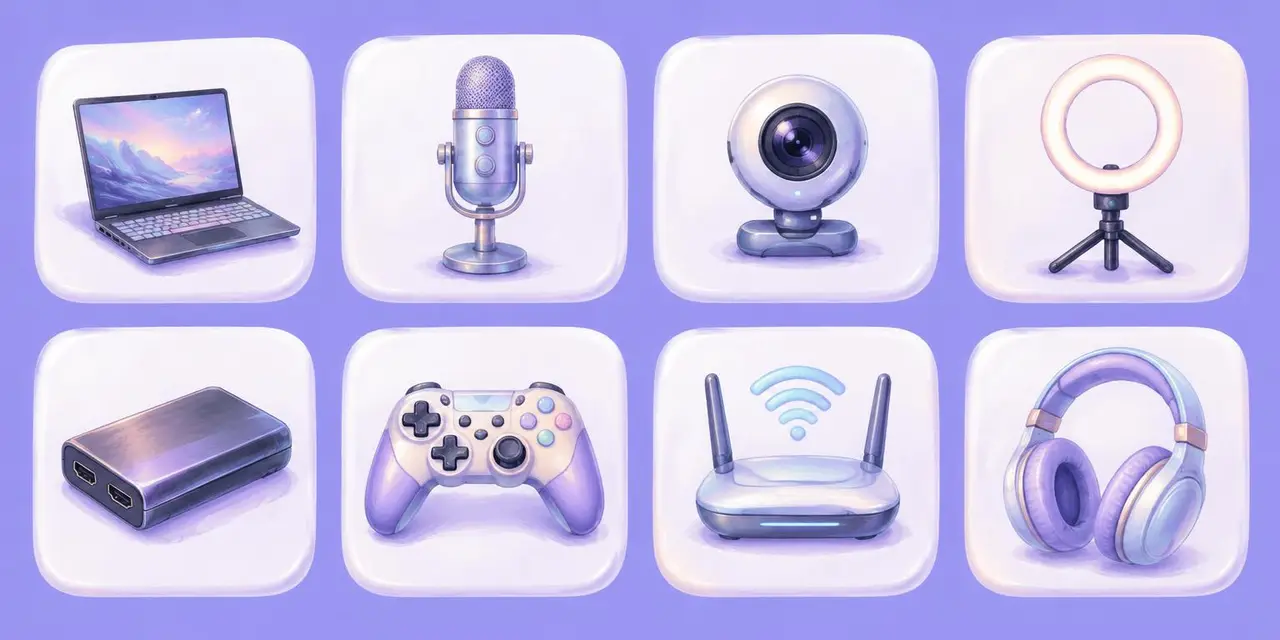
Here’s a quick checklist of the essential equipment you’ll need to start streaming:
Streaming device: PC, laptop, or gaming console
Microphone: for clear audio
Camera or webcam: to connect visually with your audience
Lighting: to improve video quality and visibility
Capture card: if you’re streaming from a console
Streaming software: to manage your broadcast
Internet connection: a stable, high-speed connection is a must
Optional accessories: like green screens, headphones, or stream decks
Let’s break down each one to help you build your perfect beginner streaming setup.
What Device Do You Need to Stream?
Your streaming device is the heart of your setup. While you can technically go live from a smartphone, a desktop PC, gaming laptop, or gaming console gives you far more flexibility, especially if you plan to use overlays, alerts, and external cameras.
For PC or laptop:
A modern multi-core processor (Intel i5/Ryzen 5 or better)
At least 16GB of RAM (more if you’re gaming and streaming on the same device)
A dedicated graphics card
A wired internet connection with at least 10 Mbps upload speed
For console:
Many streamers start with consoles like the PlayStation 5 or Xbox Series X, which offer native streaming to Twitch and YouTube. But if you want custom overlays, webcam feeds, or streaming to multiple platforms, you’ll need a PC and capture card to connect your console.
Do You Need a Good Microphone to Stream?
Audio quality is one of the most important parts of a professional-looking stream. Even if your video isn’t perfect, people will stick around if your voice is clear and pleasant to listen to.
USB microphones are easy to set up and great for beginners. For higher quality, XLR microphones paired with an audio interface are a common upgrade.
Bonus tip: Use a pop filter or foam windscreen to cut down on breathing noise and harsh “p” and “b” sounds.
Do You Need a Webcam to Stream?
Showing your face isn’t required, but it can help build trust and connection with your audience. A decent webcam gets the job done for most beginner setups. For higher video quality, a DSLR or mirrorless camera with a capture card gives your stream a professional look.
Position your camera at eye level and make sure you’re well-lit for the best results.
What Lighting Do You Need for Streaming?
Good lighting can make an affordable webcam look fantastic. Natural light works in a pinch, but for consistency, consider a ring light or softbox. The goal is to light your face evenly without harsh shadows.
A simple rule of thumb: light should face you from the front at a slight angle to reduce glare and create depth.
Do You Need a Capture Card to Stream From a Console?
If you’re streaming from a console and want to use a PC for overlays, webcam feeds, or extra controls, a capture card is a must. It sends the video and audio from your console to your PC so you can manage everything in your streaming software.
Make sure your capture card is compatible with your console and supports the resolution you want (usually 1080p or 4K).
What Streaming Software Should You Use?
Streaming software combines your video, audio, and overlays into one live broadcast. It’s where everything comes together before going out to platforms like Twitch, YouTube, or Facebook Live.
Popular options include:
OBS Studio: Free, open-source, customizable, and widely used
Streamlabs: Beginner-friendly with built-in themes and alerts
Meld Studio: A newer free option with a clean interface for beginners
Restream Studio: A browser-based option for multistreaming with guests
Heads up: Twitch Studio, Twitch’s own streaming app, was discontinued in May 2024. If an older guide recommends it, go with OBS Studio or Streamlabs instead.
Choose the one that fits your comfort level and platform needs.
How Fast Does Your Internet Need to Be to Stream?
You’ll need a strong, stable connection to avoid lag and keep your stream looking good. A wired Ethernet connection is ideal, with at least 10 Mbps upload speed recommended for 1080p streaming.
Streaming over Wi-Fi can work, but it introduces more variables and instability, especially if multiple people are using your network.
What Accessories Are Worth Adding Later?
These aren’t necessary to start, but they can level up your stream as you grow:
Green screen: Lets you remove or replace your background
Headphones: Help you monitor your audio and avoid echo
Stream deck: Lets you control scenes, sounds, and commands with one click
Second monitor: Makes it easier to manage chat, alerts, and backend tools
Can Fans Help You Build Your Streaming Setup?
Yes, and a lot of creators upgrade this way. Add the gear you’re saving for, like a better mic, a capture card, or a key light, to a wishlist and put the link in your bio and Twitch panels. Fans can gift the whole thing or chip in together with crowdfunding, and your address stays private.
Musician MICO uses Throne to grow his vinyl collection and level up his streams. For ideas, see 20 wishlist ideas for creators, or start with the Throne wishlist setup checklist.
Do You Need Expensive Gear to Start Streaming?
No. Getting started doesn’t mean you need a studio or expensive gear. Focus on the basics: clear audio, a decent camera, good lighting, and stable internet. As your skills and audience grow, you can invest in upgrades that match your content and goals.
Remember: the best streaming setup is the one that gets you live. Don’t wait for perfect. Start with what you have, and build from there.
Frequently Asked Questions
Can you start streaming without a webcam? Yes. Plenty of streamers start with audio only and add a camera later.
What upload speed do you need to stream? At least 10 Mbps upload is a good target for 1080p, and a wired connection is more stable than Wi-Fi.
Is Twitch Studio still available? No. Twitch discontinued Twitch Studio in May 2024. OBS Studio and Streamlabs are the most common replacements.